Spotidown – Free Spotify Downloader

Instagram Reels Downloader

Instagram Reels Download - reelsvideodownloader.com
reelsvideodownloader

Instagram Reels Download

Fast, Free, and No Watermark. Save any IG video to your device instantly.

Steps to Download Reels

A quick and easy way to save videos across all platforms.
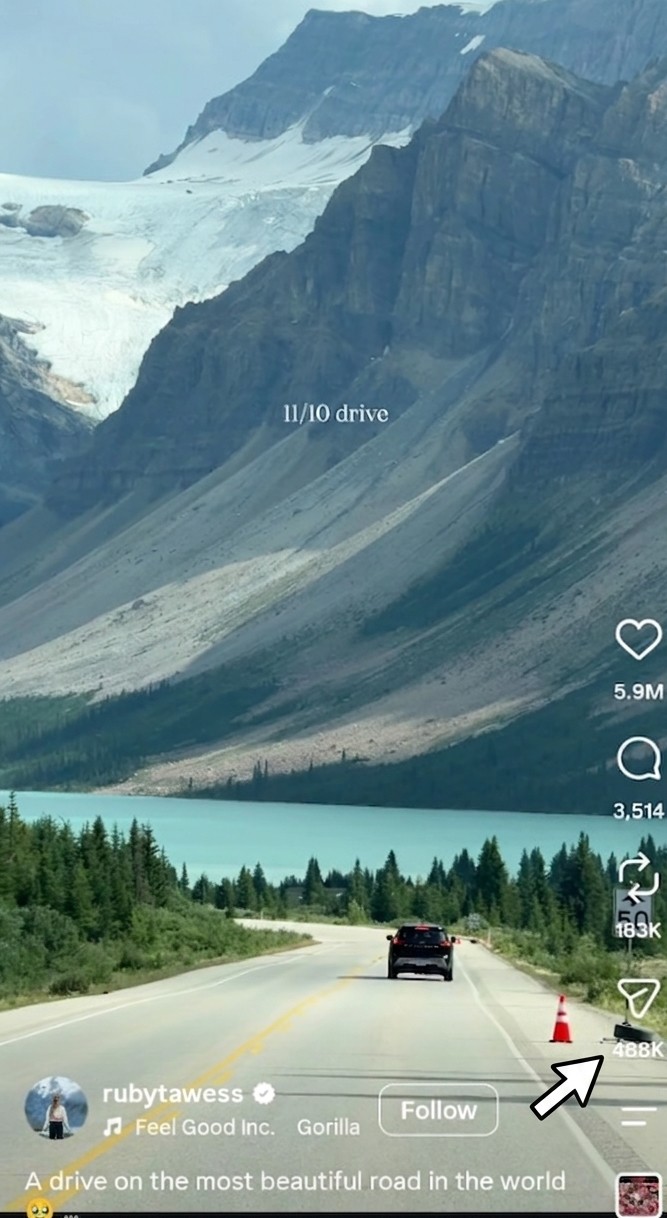
1
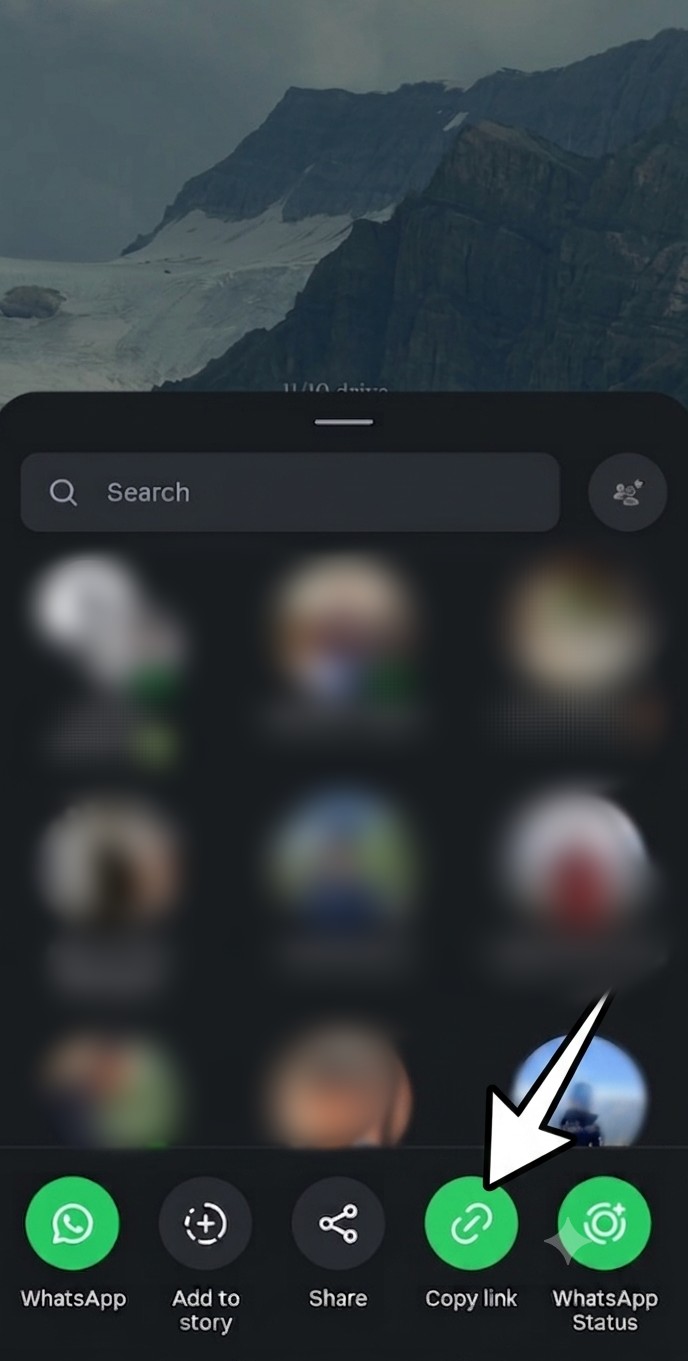
Copy Instagram Reel link
Copy Link
Find the Reel on Instagram and copy its URL.
2
Paste Instagram Reel URL
Paste URL
Paste the Instagram Reel link into the box above.
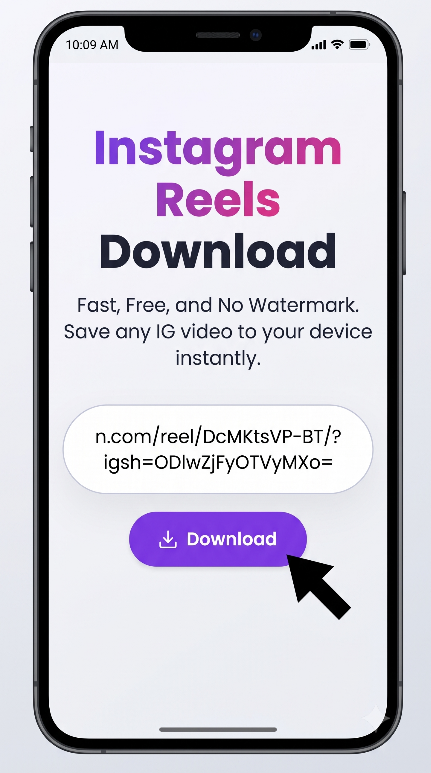
3
Download Instagram Reel
Download
Click Download and save the available video.

iOS (iPhone)

Use Safari browser. After clicking download, check the Downloads manager icon in your browser, tap the video, and save it to Photos.

Android

Use Chrome or another supported browser. Paste the link, tap Download, and save the available video to your device.

PC / Desktop

Open Instagram in your browser, copy the Reel URL, paste it into our downloader, and save the available video to your Downloads folder.

Features & Benefits

Everything you need from a modern downloader tool.

No Watermark

Download available public Reel videos without adding an extra watermark from our service.

HD Quality

Download the highest-quality video available from the supported public Reel.

Easy Downloads

Simply paste a public Instagram Reel URL and start the download process.

No App Required

Use the downloader directly from your web browser without installing additional software.

Safe & Secure

No Instagram username or password is required to use the downloader.

Fast & Free

Use the online downloader without creating an account or paying a subscription fee.

What is an Instagram Reels Downloader?

An Instagram Reels downloader is an online tool that helps users save videos from publicly accessible Instagram Reel URLs to their devices.

Whether you want to keep a copy of your own Reel, watch a public video offline, or save content for personal reference, a browser-based downloader can make the process simple.

Simply copy the URL of a supported public Instagram Reel, paste it into the downloader above, and start the download process.

Frequently Asked Questions

Everything you need to know about Reels Video Downloader

Is Reels Video Downloader free to use?
Yes. Reels Video Downloader is a free online tool for downloading supported public Instagram content. No subscription is required to use the basic downloader.
Do I need to install any software or app?
No. The downloader works directly through your web browser on supported mobile, tablet, and desktop devices.
What is the quality of the downloaded videos?
The available quality depends on the source Reel and the media returned by Instagram. The downloader provides the available video file.
Can I download content from private accounts?
No. The downloader is designed for publicly accessible Instagram content and does not require or request private-account credentials.
Where are the downloaded files saved?
Depending on your browser and device, downloaded files are generally saved to your Downloads folder or the location selected by your browser.
Do I need to provide my Instagram login details?
No. Never enter your Instagram username or password into this downloader.
Is there a limit on how many videos I can download?
Download availability may depend on server capacity, Instagram availability, and technical limitations.
Is Reels Video Downloader safe for my device?
The downloader does not require you to install an app or browser extension. Always download content from sources you trust and use the service responsibly.
Do you store my downloaded videos?
The downloader does not intentionally provide permanent storage for your downloaded videos. Processing and availability depend on the downloader's server setup.
Does Reels Video Downloader work on Android?
Yes. The website is responsive and can be used through Chrome and other compatible Android browsers.
Can I download videos using my phone's browser?
Yes. You can copy the public Reel URL, open this website in your mobile browser, paste the URL, and start the download process.
Can I download videos without the Instagram app?
Yes. You only need the URL of a supported public Instagram Reel and a compatible web browser.

Features of this tool

SpotiDown is an online tool that allows you to convert Spotify songs into MP3 format. Simply paste the Spotify track URL, and the tool will generate a downloadable audio file.

Yes, SpotiDown is completely free to use. You can convert and download Spotify tracks without any charges.

No, SpotiDown works entirely online. You can use it directly from your browser without installing any apps or extensions.

Yes, you do not need a Spotify Premium account. Just copy the song link and paste it into the tool.

SpotiDown aims to provide high-quality MP3 files, often up to 320kbps depending on the source availability.

Yes, SpotiDown does not require login details or personal information. It is safe and user-friendly.

Currently, SpotiDown supports individual track downloads. Playlist and album support may be added in future updates.

Make sure you copied the correct Spotify track URL. If the issue persists, try refreshing the page or using a different browser.

Scroll to Top